# Understanding Promises in JavaScript: Part 2
Before proceeding into what I've for this article, let's recap on what was discussed in my previous article: [Promises in JavaScript: Part 1](https://favouritejome.hashnode.dev/promises-in-javascript-part-1).
Whenever an asynchronous instruction is given to be executed, it's going to the Web Browser features (API) in the background and there wasn't a way of telling JavaScript what's going on in the background of the Browser until Promises. So **Promises** makes JavaScript aware of what's going on in the background of the Browser.
A promise is a special object that notifies JavaScript of the progress that goes on at the Web Browser background when fetching data from the internet or making a promise object.
> Also note, all Synchronous Instructions must execute first before any Asynchronous Instruction
---
Here are points to note using the `.then` method:
- Any code (function) you want to run on the returned response data must be saved on the promise object.
- The response data is added to the function to be invoked using `.then` method to the **hidden property** `onFulfilled`.
- Promise object will automatically trigger the attached function to run with the returned response data.
Now let's look at an example having multiple Asynchronous instruction to be executed. The example below is to fetch a data from the internet `fetch` and also display a string after a given duration `setTimeout()`.
```
function display(data) {
console.log(data)
}
function printHello() {
console.log("Hello");
}
function blockFor200ms() {
// Multiple loops occurring for 200ms
}
setTimeout(printHello, 0);
const futureData = fetch('https://twitter.com/will/tweets/1')
futureData.then(display)
blockFor200ms()
console.log("Me first!");
```
> The example above is gotten from the course: [Javascript: The Hard Parts](https://frontendmasters.com/courses/javascript-hard-parts-v2/) on [Frontend Masters](https://frontendmasters.com/)
Looking at the example, knowing what I've written about in [previous articles](https://favouritejome.hashnode.dev/promises-in-javascript-part-1), you'll expect all synchronous instructions to be executed first, then `setTimeout()` and finally `fetch`.
Hmm! Will it be so? Let's good through the explanation and see if it's so...
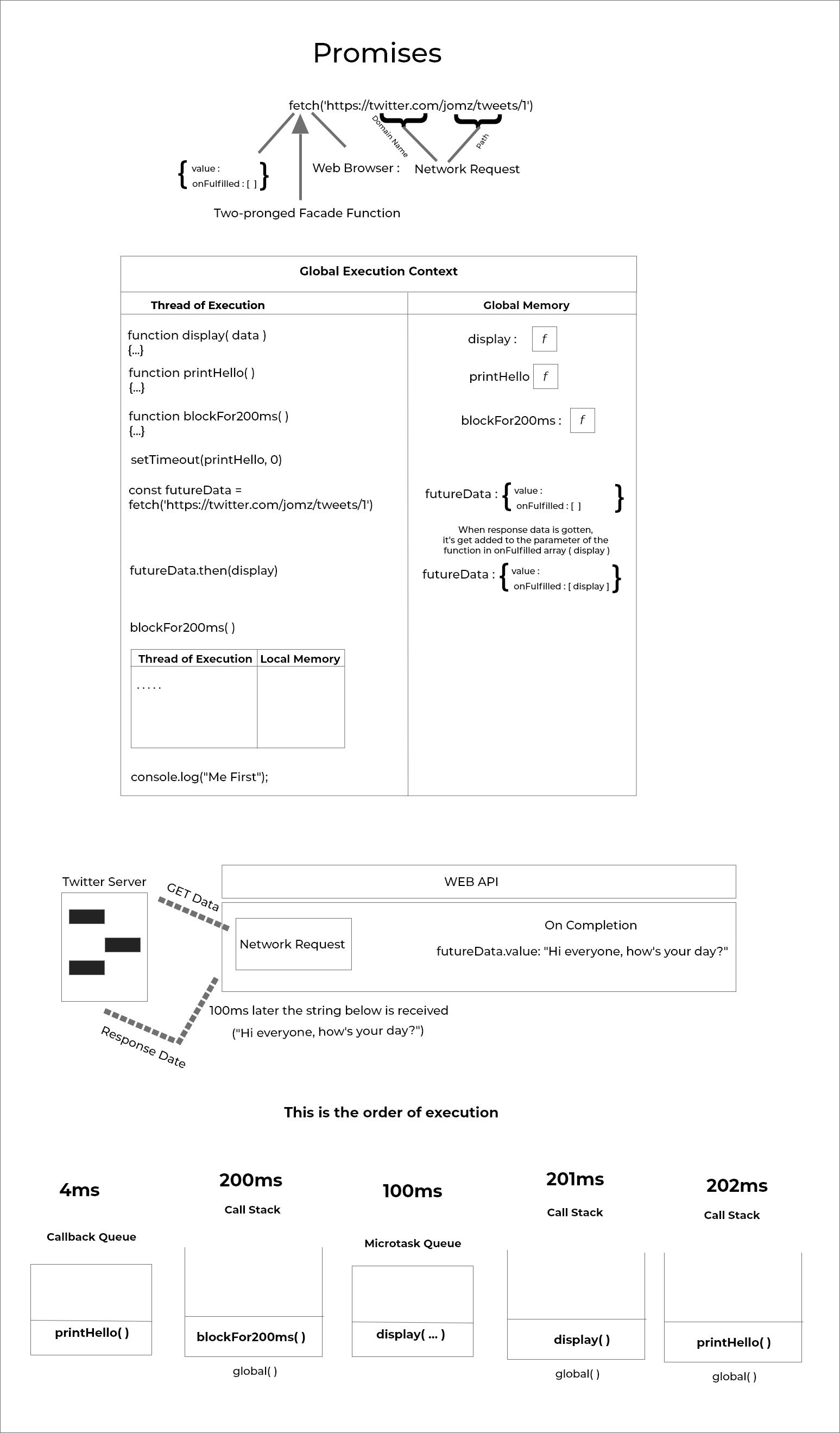
> If you'll prefer an illustration first please click [here](#image)
- Firstly, the function `display` is stored in **Global Memory** waiting to be used.
- Then the function `printHello` is also stored in **Global Memory**.
- Also the function `blockFor200ms` is stored in **Global Memory**.
> To know about the **Global Memory** read this article [here](https://favouritejome.hashnode.dev/principles-of-javascript)
- `setTimeout(printHello,0)` is executed next. Since it isn't of Javascript but a facade function which then gets added to the Web Browser API.
> Check out [Asynchronous JavaScript]() to know more _facade function_.
- The duration is `0` in the `setTimeout(printHello,0)` function. So immediately the callback function `printHello` gets added to the **Callback Queue**.
- Then the variable `futureData` is assigned to hold the promise object returned from `fetch` which is to get some data (response data) at a given URL (Uniform Resource Locator).
> Recap, from [Promises in JavaScript: Part 1](https://favouritejome.hashnode.dev/promises-in-javascript-part-1) the promise object has some properties which are: `value` and`onFulfilled`.
- `futureData.then(display)`: this line of code is saying, whatever response data that'll be received and added to the `value` property of the promise object, should be added to the function `display` in the `onFulfilled` property array.
- `blockFor200ms()` in then invoked and gets added to the Call Stack.
> The block of imaginary instructions above will be running for 200ms
Meanwhile, `blockFor200ms()` is executing, Twitter's API which is to return a response data, has returned the response data which is `"Hi everyone, how's your day?"`.
It took `100ms` to get the response data from Twitter, meanwhile, `blockFor200ms()` is still executing. Then the response data gets added the `value` property in the promise object and automatically sent to the `display` function in the `onFulfilled` property.
At this point, `display` function is ready to be executed and get added to Call Stack but unfortunately, it can't.
Why? Well `blockFor200ms()` isn't done executing and is in the Call Stack already. So where does it get added?
Well `display` function gets added to **Microtask Queue**
- After 200ms `blockFor200ms()` is done executing and popped off the Call Stack, then
- `console.log("Me first!")` is executed and displays `"Me first!"` at the console of the browser.
Remember `printHello` and `display` hasn't been executed, for JavaScript engine to know which of the functions is to be added to the Call Stack, the **Event Loop** is needed. The Event Loop checks if Call Stack is empty or not.
> Event Loop has been discussed [here](https://favouritejome.hashnode.dev/asynchronous-javascript)
At this point the Call Stack is empty, so the **Event Loop** checks **first, if the Microtask Queue** has a reference to a function to be executed.
> I made use of the word "has a reference to a function to be executed"
>
> Meaning the function itself isn't in Mirotask Queue, it's just a reference to label `display` at the **Global Memory** where it is stored to be used, same goes to functions I have addressed without the parenthesis `()`
Yeah, it does have reference to `display` function, so `display()` gets added (pushed) to the Call Stack. When done executing, it gets popped off the Call Stack.
Then finally, the **Event Loop** checks if the Callback Queue has a reference to a function to be executed.
Yeah, also the Callback queue has a reference to `printHello` function, so finally `printHello()` gets added (pushed) to the Call Stack and pops out from the Call Stack when done executing.
---
If you've read my previous article I mentioned that they're three properties in a promise object, which are `value` and `onfulfilled`. The last one is `onrejection`. This is when there is some sought of errors while fetching data or you just want to display an error.
In order to display an error in a much more presentable way, you'll have to make use of these methods:
```
// errorFunction is the function that's to be called on error
.catch(errorFunction)
// OR
.then(nonerrorFunction, errorFunction)
// The first callback is executed onfulfillment while
// The second callback is executed onrejection
```
Wow! The explanation is lengthy. But I hope it's helpful
## Conclusion
Just to be clear on everything that I've discussed, whenever a facade function e.g. `setTimeout()`, `setInterval()` and so on, takes a **callback function** and a duration in this because it's get added to the **Callback Queue**.
Meanwhile, a two-pronged facade function `fetch` and a promise object created `new Promise(...)` having a function to be executed gets added to the **Microtask Queue** not the Callback Queue.
The **Event Loop** has a higher priority to check the Microtask Queue firstly before the Callback Queue to push any function in them to the Call Stack.
**Thanks for Reading** if you've read so far. I'll see you at the next article.